
Need a full custom project? See the options below.
Need a full custom project? See the options below.
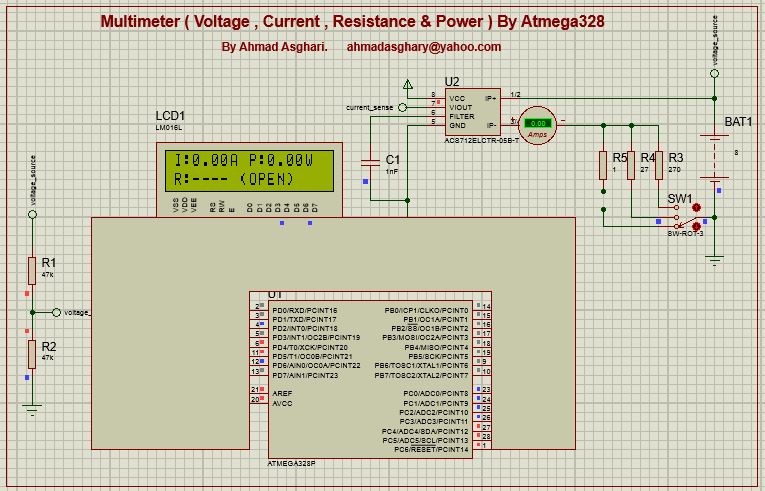
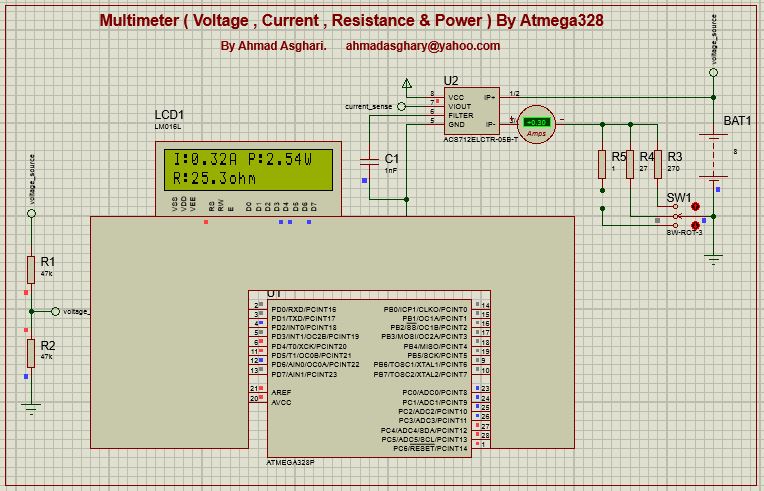
PowerLens is a complete Arduino digital multimeter project, built around the ATmega328P microcontroller and the ACS712 Hall-effect current sensor. It measures voltage, current, power and load resistance in real time and shows them on a 16×2 LCD. The full circuit is simulated and tested in Proteus, and you get the Arduino source code, the Proteus file and clear PDF documentation.
If you need a working power meter for a class project, a thesis, or your own bench, this package saves you the hours of wiring, debugging and code writing.
Building a reliable multimeter with Arduino looks simple, but most people get stuck on the same things: noisy current readings from the ACS712, wrong voltage divider scaling, unstable LCD values, and code that is hard to change. PowerLens handles all of these in one tested design, so you can study a working system instead of starting from zero.
.ino / .cpp) with the required librariesNeed a different version? Custom changes are available as a separate paid service. For example:
Send us your requirements and we will reply with the scope and price.
Proteus for circuit simulation and the Arduino IDE for the firmware (embedded C++ for the ATmega328P). The PDF documentation opens in any PDF reader.
Browse more ready-to-use files in the Engineering Downloads shop.
Yes. The whole circuit runs in Proteus, so you can see the LCD values change as the load changes, all on your computer.
The ACS712-05B, which is the ±5 A version of the ACS712. If you need a higher current range, the design can be adapted to another ACS712 version as a custom modification.
Yes. You get the full source code (.ino / .cpp) and the required libraries, not a compiled file only.
Yes. It is a good base for a class project or thesis on measurement systems. Use it to learn and build on, and give credit to the original design where your university requires it.
Yes. Changes such as a different sensor, extra features, wireless data or another microcontroller are available as a paid custom service. Contact us with your requirements.
Proteus to run the simulation, the Arduino IDE to open and upload the code, and any PDF reader for the documentation.
Author: Ahmad Asghari. All rights reserved by the author; copying or redistribution is not allowed.
🔹 Questions about this project or a custom version? 📩 Contact us at info@engineeringdownloads.com, or visit EngineeringDownloads.com.
More from the same author: Solar PV Design Toolkit in Excel, a complete workbook for PV system sizing, energy yield and payback.
Need more than the files?
There are two ways we can help. Book a one hour online consultation if you want to talk a problem through with a CAE engineer, using the checkbox in the order box. Order a project if you need a full simulation built for you, delivered to an agreed scope, price and deadline under a written contract.
We work on FEA and CFD for engineers, researchers and companies. Order your project, or message us on WhatsApp for a quick reply.
Other packages engineers working on this topic also download.
 HSPICE Course
 Modeling the Fatigue Response of Reinforced Concrete Columns Using the Direct Cyclic Procedure
 Air Blast Simulation on Reinforced UHPC: Damage Evaluation
 Axial compression test of a composite panel made of profiled steel skin and concrete core
 Vibration in functionally graded material circular cylindrical and testing its validity
 Low and High velocity impact analysis of a T-shaped steel reinforced concrete column
 Four-Point Bending of a Bolted Timber–Steel Composite Beam in Abaqus: Hill Plasticity & Force–Displacement
 Prediction model of depth of penetration for alumina ceramics turned by abrasive waterjet—finite element method and experimental study

Need a full custom project? See the options below.

€129,00

€179,00

€149,00

€119,00

€129,00
See more
Want to receive push notifications for all major on-site activities?